Senior Frontend Architect, 10+ years building production Next.js applications. Contentful Certified Professional (2024). Specializes in React Server Components, headless commerce, and Core Web Vitals engineering.
If you run a store, you have probably been told to "go headless" and never got a straight answer about what that means for you rather than for a developer. So here is the plain version, written for the person who approves the project, not the person who codes it. We will cover what headless commerce actually is, when it earns its cost and when it doesn't, what it does to the things you care about (how fast your store loads, where it ranks, how it looks), whether it fits the platform you already run, and what you get when someone builds it for you on a template that already handles the hard parts. No code, and nothing left unexplained.
What is headless commerce, in plain terms?
Your store is really two systems bolted together. The backend runs the business side: products, prices, stock, orders and payments. The storefront is what the customer sees and clicks: the homepage, the product pages, search, the cart and the path to buying. On a normal Shopify or Magento store those two come as one package, and the theme you pick decides how fast and how flexible the shop can be. Headless just splits them apart. You keep the backend as it is and replace the theme storefront with a custom one built for your shop. Customers still check out through Shopify or Magento, and you still run everything from the same admin. The only thing that changes is the part they look at, and that part happens to decide how fast your pages load, how good the shop looks, and how many visitors actually buy.
Is headless commerce worth it for my store?
It is worth it when the storefront is what's slowing your growth, not the product or the marketing. The signs are easy to measure, and you have probably felt a few of them already. If the list below sounds like your shop, headless usually pays for itself. If none of it does, a good theme is still the right choice, and you should keep your money.
- Your pages are slow on phones and it is costing you sales. A slow shop loses people before they even see the product, and speed now affects both your ranking and your conversion rate. Phones are where it hurts most: carts are abandoned there at 80.45 percent against 68.62 on desktop, and a heavy storefront is a large part of that gap.
- Your Core Web Vitals are failing in Google Search Console, and the theme tweaks your team tried never got the numbers into the green. Stores that do clear those thresholds see 24 percent fewer visitors leaving before the page has even finished loading.
- You have run out of room in your theme. You want a look that stands out, a custom product page or a specific way to buy, and every change turns into a fight with the template or another paid app.
- Your shop looks like everyone else's. A theme that thousands of merchants use can't give you a brand of your own, and how a shop looks is part of whether people trust it.
- You are replatforming or growing fast and want a storefront you won't have to throw out in two years.
How much does a slow storefront actually cost?
The numbers are blunt, and they are not mine. Google's research found that as a mobile page goes from one second to three seconds to load, the chance a visitor bounces rises by 32 percent. Deloitte measured the same thing from the other side: a tenth of a second of extra speed lifted retail conversion by 8.4 percent. Portent put a rate on it, roughly 4.42 percent of your conversion gone with every extra second across the first five. And the Baymard Institute puts the average cart abandonment rate at 70.22 percent, rising to 80.45 percent on phones against 68.62 on desktop, much of it avoidable friction at exactly the moments a fast, well-built storefront is designed to smooth over. A slow theme charges all of that as a quiet tax every day, and closing that gap is the honest reason to go headless.
Google also keeps a public list of what fixing it was worth to named stores, which is more useful than any agency case study because the stores reported the numbers themselves.
| Store | What they fixed | What they measured |
|---|---|---|
| Rakuten 24 | Core Web Vitals across the storefront | 53.37% more revenue per visitor, 33.13% higher conversion rate |
| Lazada | Largest contentful paint, 3x faster | 16.9% higher mobile conversion |
| Vodafone Italy | Largest contentful paint, 31% faster | 8% more sales |
| Agrofy Market | Largest contentful paint, 70% faster | 76% less load abandonment |
| Nykaa | Largest contentful paint, 40% faster | 28% more organic traffic |
| NDTV | Largest contentful paint, halved | 50% better bounce rate |
What do I actually get with a done-for-you headless template?
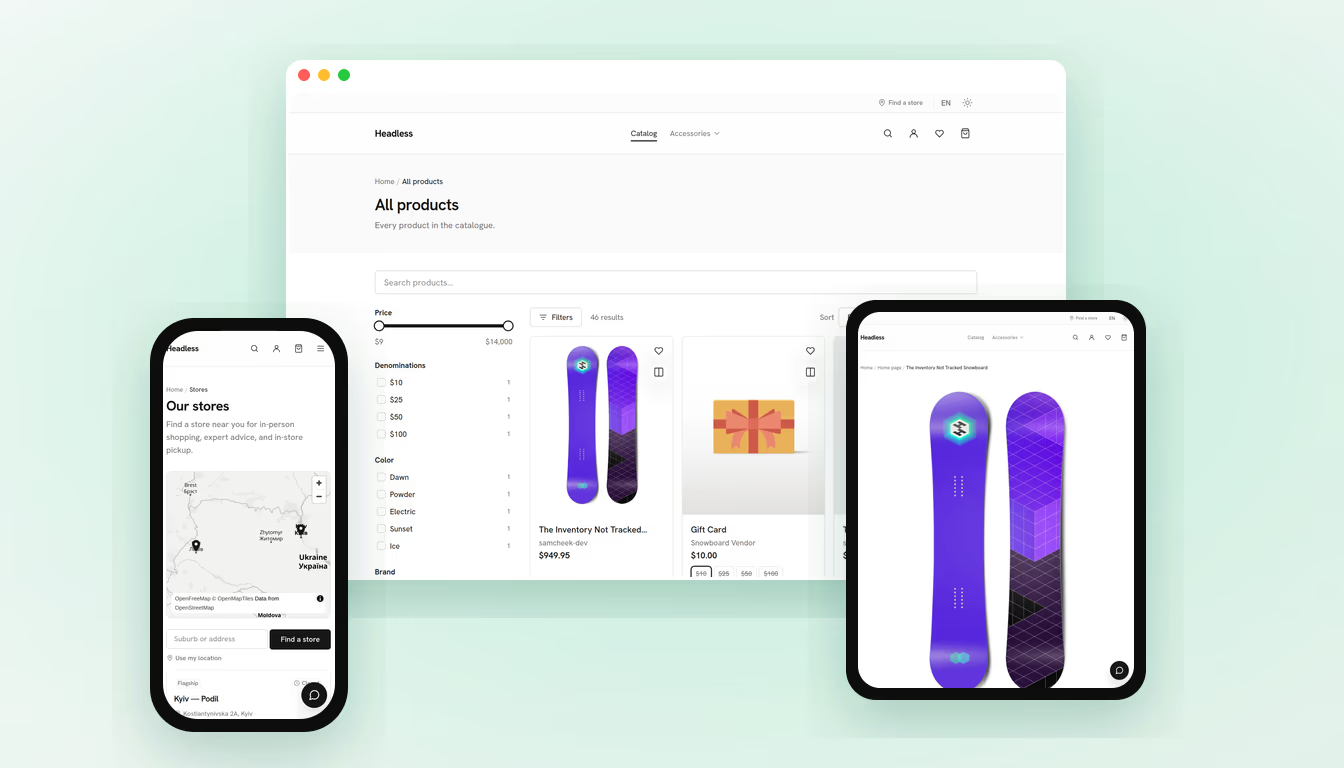
You get a storefront that is already fast, already accessible, already carrying the features shoppers expect, and already yours to rebrand, running on either Shopify or Magento. The reason it comes that way is simple: the hard, expensive parts are done and tested, so your money goes into your shop instead of into rebuilding the basics. This one is a connect-and-launch service, not a fragile one-off. You connect your backend and get an optimized storefront in hours. Everything below is already built and switched on by config, not a paid add-on for later.
- Fast pages by default. Core Web Vitals in the green and strong Lighthouse scores out of the box, and a CI check that keeps them there. Faster pages sell more and rank higher.
- Accessibility that is actually checked. WCAG 2.2 AA: full keyboard use, correct labels, a cart and search that work with a screen reader. It is tested automatically on every change, so it can't quietly break. This widens who can buy from you and lowers your legal risk.
- Reliability you can lean on. The template ships with 460+ automated tests and CI gates for performance, accessibility and code quality. Your shop behaves the same six months after launch as it did on day one.
- Design that is fully yours. The whole look runs on design tokens, so a rebrand is one change in one place. No rebuild.
- The features shoppers expect. Product reviews and star ratings, a wishlist, product recommendations, image galleries with zoom, colour swatches, faceted search (native, or Algolia if you prefer), clear pricing and stock, and trust cues at checkout. The whole template is built to Baymard's conversion research, so all of this comes as standard, not as an add-on. That research is worth reading on its own: unexpected costs at checkout are the single biggest reason carts get abandoned, named by 48 percent of shoppers, and Baymard's testing puts the conversion an average large store is leaving on the table through checkout design alone at 35.26 percent.
- Star ratings in Google. Reviews come with the right structured data, so your products can show stars in the search results. That is free visibility a plain theme rarely gives you.
- Your content stays where it is. The blog and content pages plug into the CMS you already use, whether that is Payload, Sanity, Contentful or Adobe Experience Manager, through ready-made adapters.
- One storefront, either backend. The same shop runs on Shopify or Magento, so the platform is something you can change later without scrapping the storefront.
- Ready for search and for AI. Clean markup, structured data, sitemaps and metadata on every page, so Google and AI assistants can both read and quote your shop.
Headless Shopify vs a regular Shopify store: what changes for me?
The way you run the business barely changes. The way your customers experience it changes a lot. You stay in the Shopify admin you already know: same place to add products, manage stock, run promotions and read orders, and checkout and payments stay on Shopify's own secure system. What changes is the storefront sitting in front of all that. Instead of a theme shared by thousands of shops, you get a frontend built for yours: faster, fully branded, and able to do things a theme can't manage without a stack of apps dragging it down. There is a real cost to be honest about. A headless storefront is a build, not a theme you flip on in an afternoon, so it costs more up front and only makes sense once the storefront is genuinely in your way. If your current theme still does the job, that spend isn't justified yet, and you deserve to be told so.
Does headless commerce help SEO and Google rankings?
Yes, if it's built right, and there are a few ways it helps. Speed is a ranking factor, so a storefront that passes Core Web Vitals where a slow theme failed lifts a real handicap off your rankings. Reviews come with the correct structured data, which lets your listings show star ratings in Google and get more clicks without moving your position. And clean markup makes your pages easy for AI assistants to read and quote, which matters more every month as shoppers ask an assistant for a recommendation instead of scrolling a results page. There is no trick to that part, and Google says so itself: there is no special markup you can add to get picked up by its AI answers, only pages that are indexed, readable and kept in real text. The shops that get named are the ones whose pages are readable and well described. A fast, correctly built headless storefront reads well to both Google and those assistants, while a slow theme buried under apps often does not. Headless won't rank you by magic, but it clears the technical reasons a good shop gets held back.
Will it work on Magento, or only Shopify?
Both. The same storefront runs on Shopify or on Magento (Adobe Commerce). It talks to your backend through a shared layer instead of being wired to one platform's quirks, and that layer is tested against both, so what works on one works on the other. This helps two kinds of owner. If you are on Magento and feel stuck inside the Luma theme, or you run a big or complex catalog, you get a modern, fast storefront without leaving Magento. And if you are thinking about changing platforms, you are not locked in: you can keep the storefront even if you swap the backend under it later. In practice, the expensive, customer-facing part of your shop is protected from a migration instead of being thrown away in one.
How long does it take and what does it cost?
The storefront itself comes up fast, because this is a connect-and-launch service rather than a build from scratch. You connect the backend, drop in your brand tokens and content, and a themed, optimized shop is live in hours instead of the weeks a bespoke build needs. That speed is what keeps a custom headless storefront affordable at all: the hard guarantees are already solved, so the work goes into your shop and your specific needs. There is no honest flat price, because the total depends on scope: how many page types, how big the catalog, which integrations you need. Packages here start at $3,500 for a fixed scope and the pricing page sets out what sits in each tier, but the useful next step isn't a quote, it's a short call to look at your actual store, after which you can get a real timeline and a real range instead of a guess.
When does headless NOT make sense?
When your theme still does its job. If the shop is fast enough, your Core Web Vitals pass, the design is fine and you are not fighting the template to build what you want, headless is a cost with nothing to show for it, so leave it. It also rarely makes sense for a brand-new shop with little traffic and an unproven product. At that stage your money is better spent finding out what sells. Headless earns its place once the storefront is measurably the bottleneck, and anyone worth hiring will say so plainly when it isn't, rather than sell you a build you don't need. The goal is a storefront that pays for itself, not the biggest invoice.
How do I see it and get started?
The quickest way to get it is to use one. There is a live demo store built on this template. Open it on your phone and see how fast the pages and the mobile checkout feel next to a typical theme. If that looks like the shop you want, the next step is a short call about yours: your platform, your catalog, and what is slow or getting in your way today. You can start on the contact page, or just tell the assistant on this site what you are building and it will point you the right way. You work straight with the person who designs and writes the storefront, a solo senior developer rather than an agency, so nothing gets lost between whoever sold the work and whoever does it.