Senior Frontend Architect, 10+ years building production Next.js applications. Contentful Certified Professional (2026). Specializes in React Server Components, headless commerce, and Core Web Vitals engineering.
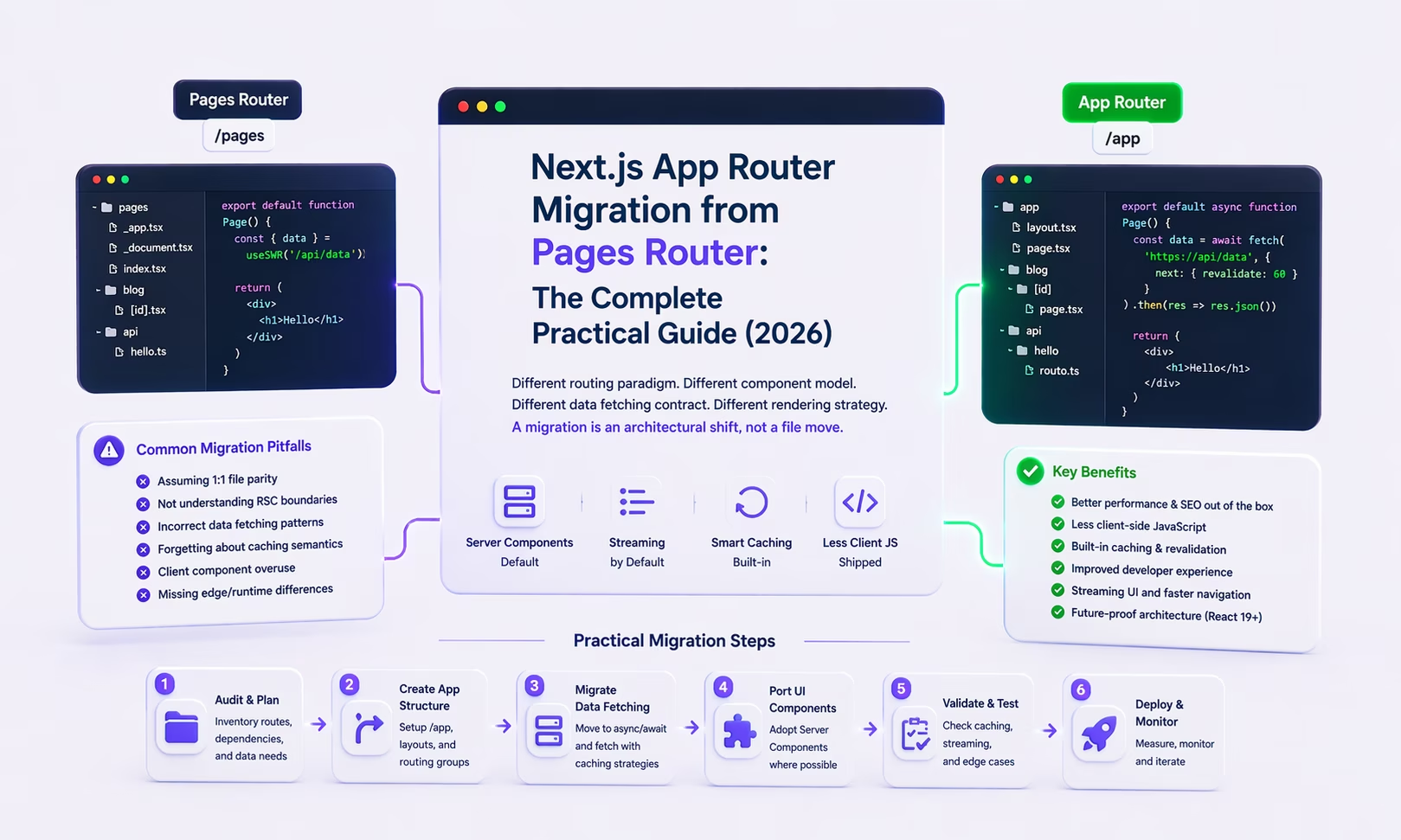
The Next.js App Router, stable since Next.js 13.4 (May 2023) and fully mature in Next.js 15 (October 2024), isn't an incremental refinement of the Pages Router. It's a parallel routing implementation built on three foundational changes: React Server Components, which shift the component model from a client-side tree to a server-first tree with explicit client opt-in; the React concurrent renderer and Suspense streaming, which replace synchronous props injection with async out-of-order HTML delivery; and a new filesystem convention that promotes layouts, loading states, and error boundaries from app-level concerns to framework primitives. In this post I walk through the migration across four dimensions: the hydration cost model RSC fundamentally changes, the webpack module graph mechanics that govern 'use client' boundary placement, the Data Cache internals that control fetch deduplication and revalidation, and the incremental migration protocol that lets both routers coexist safely in production.
What does Pages Router get wrong about hydration cost?
It ships a serialized copy of the entire page's React tree to the browser and hydrates all of it, whether or not a given component was ever interactive. That cost is structural rather than accidental, which is what makes it worth understanding before comparing the two routers. When a Next.js Pages Router application renders a page via renderToString or renderToPipeableStream, it produces two artifacts: (1) an HTML string delivered to the browser, and (2) a JSON blob embedded in __NEXT_DATA__ that contains the serialized React virtual DOM tree for the entire page - including all props, all data, and all component state. The browser receives both artifacts and begins hydration.
Hydration in the Pages Router is an O(n) operation over the entire component tree. React walks every component - regardless of whether it is interactive - to attach event listeners and verify the client-computed VDOM matches the server-rendered HTML. For a product page with 50 components where only 3 (<AddToCart>, <QuantitySelector>, <WishlistButton>) have event handlers, React nonetheless traverses all 50. The JavaScript for all 50 components must be parsed, compiled, and executed on the main thread before the page is interactive. This is the fundamental hydration tax: a cost proportional to total component tree size rather than interactive surface area. That hydration tax is also the dominant lever on interaction latency - the mechanics of reducing it are covered in INP Optimization in Next.js 16.
The App Router changes this through the RSC component model. Server Components are not shipped to the browser as JavaScript - they are rendered on the server to an HTML representation that is woven into the initial response. The browser's JavaScript engine never sees these components; there is no parse, compile, or hydration cost for them. Only 'use client' components require hydration. A product page with 50 components and 3 interactive ones ships JavaScript only for those 3 - the hydration cost is O(k) where k is the interactive surface, not O(n) where n is the total component tree. This is not a micro-optimization; for typical eCommerce product pages, this represents a 65–80% reduction in hydration work measured in main thread CPU time.
- Component model. The Pages Router operates entirely within the React client component model. Every component is a client component by default - it has access to browser APIs, can use hooks, and is hydrated in the browser. The App Router introduces React Server Components: components are server-only by default, execute on the server, have direct database and filesystem access, and contribute zero bytes to the client bundle. Client interactivity is opt-in via the
'use client'directive. - Data fetching contract. The Pages Router externalizes data fetching via lifecycle functions (
getServerSideProps,getStaticProps,getInitialProps). These functions are co-located with the page file but architecturally separate from the component. The App Router internalizes data fetching: Server Components can beasyncfunctions -const data = await db.query(...)is valid inside a Server Component. There are no lifecycle functions; the component is the data fetching unit. - Layout model. The Pages Router implements shared layouts through
_app.tsx/_document.tsx- a single global wrapper. Nested layouts require manual wrapper components. The App Router implements nested layouts natively throughlayout.tsxfiles in the directory hierarchy. A layout atapp/dashboard/layout.tsxwraps all routes under/dashboardand preserves its React state across navigations within that subtree - without re-mounting. - Rendering strategy granularity. The Pages Router configures rendering strategies per-page via exported functions. The App Router configures them per-fetch via
fetch()options (cache,next.revalidate,next.tags) and per-route viaexport const dynamicsegment config - more granular, but also a more complex mental model that requires deliberate architectural decisions at every data boundary.
How does the filesystem layout change when you migrate from /pages to /app?
The App Router uses a distinct filesystem convention that coexists with the Pages Router rather than replacing it. This coexistence is the architectural foundation of the incremental migration strategy - both routers operate simultaneously in a single Next.js application.
- Page files:
pages/about.tsx→app/about/page.tsx. Thepage.tsxconvention replaces filename-equals-route. - Layouts:
pages/_app.tsx→app/layout.tsx(root layout, required). Nested layouts:app/dashboard/layout.tsxfor all/dashboard/*routes. - Loading states: New
app/[route]/loading.tsx- automatically wraps the page in a Suspense boundary and shows loading UI during server-side data fetching. - Error boundaries: New
app/[route]/error.tsx- automatically wraps the segment in a React Error Boundary, enabling per-route error handling. - API Routes:
pages/api/hello.ts→app/api/hello/route.ts. Route Handlers use Web APIRequest/Responserather than Next.js-specificreq/res. - Not-found page:
pages/404.tsx→app/not-found.tsx. Custom<html>/<body>attributes previously in_document.tsxmove intoapp/layout.tsxdirectly.
How does App Router actually dedupe fetches and handle revalidation?
One of the least understood aspects of the App Router migration is how the Data Cache works at the implementation level - because its behavior directly contradicts the intuition of developers trained on getServerSideProps. In the Pages Router, data fetching is externalized to lifecycle functions specifically to prevent components from issuing redundant API calls. In the App Router, data fetching is colocated inside components - yet does not cause redundant network requests. The mechanism is: Next.js monkey-patches the global fetch function at server startup to intercept every fetch() call during a server render. Two caching layers operate on top of this interception.
- Request Memoization (per-render deduplication): During a single server render pass, any two
fetch()calls with identical URL + method + body return the same in-memory response - the second call never reaches the network. This means<ProductTitle>,<ProductImages>, and<ProductSchema>can each callfetch('/api/product/123')independently, and only one HTTP request is made. This is implemented via aMap<string, Promise<Response>>keyed on the request fingerprint, scoped to the React render tree. The Map is cleared between requests. - Data Cache (cross-render persistence): Responses tagged with
next: { revalidate: N }ornext: { tags: ['...'] }are stored on disk (or in a configured cache backend) across render passes. A product page that setsrevalidate: 3600issues one real API call per hour regardless of traffic volume - 10,000 concurrent requests all read from the same cached response. Tag-based invalidation (revalidateTag('product-123')) removes the specific cache entry; the next request regenerates it. This is architecturally equivalent to ISR but operating at the per-fetch granularity rather than the per-page granularity. getServerSideProps→ async Server Component: The transformation eliminates the props-injection indirection. The page component isasync; data is fetched with a plainawaitinside the component body. The Data Cache ensures this is not a performance regression - the first concurrent request pays the network cost, all subsequent ones within therevalidatewindow pay zero.getStaticProps+getStaticPaths→generateStaticParams+cache: 'force-cache':generateStaticParams()runs at build time and returns the param combinations to pre-render. The defaultfetch()cache mode isforce-cache, making static rendering opt-out rather than opt-in. ISR is configured viaexport const revalidate = Nat the route segment level - a single export controls the entire route's revalidation window rather than requiring it in everygetStaticPropsreturn value.
How do you port getStaticPaths and getStaticProps to App Router?
- Pages Router:
getStaticPathsreturns{ paths, fallback: 'blocking' }.getStaticPropsreturns{ props: { post }, revalidate: 3600 }. - App Router:
export async function generateStaticParams() { return posts.map(p => ({ slug: p.slug })); }- equivalent togetStaticPaths. Static rendering is the default whenfetch()usescache: 'force-cache'. ISR viaexport const revalidate = 3600at segment level. fallback: 'blocking'equivalent:export const dynamicParams = true(default) - routes not ingenerateStaticParamsare server-rendered on first request and cached.
How do you convert /pages/api routes to /app/api Route Handlers?
- Pages Router:
export default function handler(req: NextApiRequest, res: NextApiResponse) { if (req.method === 'POST') { res.status(200).json({ ok: true }); } } - App Router:
export async function POST(request: Request) { const body = await request.json(); return Response.json({ ok: true }); }- named exports per HTTP method, standard Web API, no method-checking conditionals. - Dynamic segments:
pages/api/users/[id].ts→app/api/users/[id]/route.ts. Theidparam is accessed viaparams: { id: string }as the second argument.
How does the 'use client' directive actually work in the webpack module graph?
The 'use client' directive is the most consequential decision in an App Router application, and the most commonly misunderstood. Its behavior is determined by webpack's module graph construction algorithm, not by React's component model alone. Understanding the webpack level is essential for correct boundary placement.
When webpack processes a Next.js App Router build, it constructs two distinct module graphs: a server graph (the RSC bundle, never shipped to the browser) and a client graph (the browser bundle). The 'use client' directive at the top of a file is a module graph boundary declaration - it tells webpack: 'this module and every module reachable from it via import statements belongs in the client graph.' Critically, the boundary is transitive: if ProductPage.tsx is marked 'use client', then ProductPage's imports (formatPrice.ts, useAnalytics.ts, fetchProduct.ts, ProductImage.tsx) are all pulled into the client bundle, recursively. The bundle cost of a misplaced 'use client' is not the size of the marked component - it is the size of the entire import subgraph rooted at that component.
- The correct mental model: Server Components are leaves in the module dependency tree that can import Client Components, but Client Components cannot import Server Components (because Server Component code must never reach the browser). The
'use client'boundary marks the root of a client subtree. Place it as deep in the component hierarchy as possible - at the smallest component that genuinely requires browser APIs or event handlers. - Practical impact: A
<ProductPage>component that imports a<PriceDisplay>component that imports a formatting utilityformatCurrency.ts- if<ProductPage>is'use client', all three ship to the browser. If only<AddToCartButton>is'use client', and<ProductPage>imports it alongside<PriceDisplay>and<ProductImages>(both Server Components), only<AddToCartButton>and its imports ship to the browser. The distinction in bundle size is typically 50–150 KB gzip for a realistic product page. - Client Reference Objects: When a Server Component imports a
'use client'component, webpack emits a Client Reference Object - a JSON pointer to the chunk ID in the client manifest. The server renders this reference into the RSC wire format payload; the browser resolves the reference to the actual component from its downloaded bundle. This is why'use client'components receive props from Server Components seamlessly despite the server never executing the client component code.
What's the safest incremental migration path from Pages Router to App Router?
The coexistence of both routers in a single Next.js application is not a transitional hack - it is a first-class, supported configuration. Next.js resolves routes by checking app/ before pages/; a route defined in both uses the app/ implementation. The production application serves Pages Router and App Router routes simultaneously with no performance penalty for the coexistence itself. This enables a risk-controlled migration where each route is migrated, verified in production, and only then removed from pages/.
- Phase 1 - Root layout (zero-risk): Create
app/layout.tsxreplicating_app.tsx/_document.tsx:<html lang>,<body>, global CSS imports, font loading, analytics providers. Thepages/directory is untouched. Verify the build. This step has no user-visible impact. - Phase 2 - Static leaf routes: Migrate pages with only
getStaticProps- blog posts, documentation, marketing landing pages. These transform to async Server Components withgenerateStaticParams. No client interactivity to manage. Verify LCP and CLS in CrUX after deployment - these routes should show immediate improvement. - Phase 3 - Data utility extraction: Before migrating dynamic routes, extract shared data fetching into typed server-only utilities (
lib/data.tswithimport 'server-only'). This replaces the per-pagegetServerSidePropsboilerplate pattern and makes the component-level data fetching safe by preventing accidental client-side import of server utilities. - Phase 4 - Dynamic pages with interactivity: The highest-complexity phase. Architectural pattern: the route segment (
app/product/[handle]/page.tsx) is a Server Component that fetches data and renders the static product tree. Interactive components (<AddToCartButton>,<VariantSelector>) are'use client'leaves imported by the Server Component. The'use client'boundary is at the leaf, not the page. - Phase 5 - API Routes → Route Handlers:
pages/api/*.ts→app/api/*/route.ts. Named method exports replace method-conditional logic. The WebRequest/ResponseAPI replacesNextApiRequest/NextApiResponse. Migrate last - lowest coupling, most mechanical transformation. - Phase 6 - Cleanup: Delete
pages/directory. Remove_app.tsx,_document.tsxremnants. Runnext buildand verify no orphaned route warnings.
Which App Router pitfalls cause the most production incidents, and how do you avoid them?
Six, and they repeat across almost every migration: 'use client' boundary escalation, Context providers placed in Server Components, cookies() or headers() read inside cached routes, non-serializable props crossing the Server/Client boundary, generateStaticParams missing on dynamic routes, and third-party libraries that cannot run in a Server Component. Teams that get through cleanly understand the mechanism behind each one, not just the symptom.
- Pitfall 1 -
'use client'boundary escalation. Marking every component'use client'to resolve hook errors, progressively escalating the boundary until the page itself is a Client Component - eliminating all RSC benefits. Resolution:'use client'is an exception requiring explicit justification. Only components using hooks, browser APIs, or event handlers require it. - Pitfall 2 - Context providers in Server Components. React Context is a Client Component API. Wrapping an entire application in a Context provider forces every child into the client bundle. Resolution: wrap only the interactive subtree that requires the context in a
'use client'provider. - Pitfall 3 -
cookies()/headers()in cached routes. Readingcookies()orheaders()opts the entire route into dynamic rendering, disabling the Full Route Cache. Resolution: move them into the narrowest necessary scope; useunstable_noStore()only on the specific fetch requiring dynamic behavior. - Pitfall 4 - Non-serializable props across the Server/Client boundary. The RSC wire format serializes Server→Client props as JSON. Functions, class instances, and Dates cannot cross this boundary. Resolution: pass only plain JSON-serializable data; encapsulate server logic in Server Actions (
'use server'). - Pitfall 5 - Missing
generateStaticParamson dynamic routes. Without it, all dynamic route segments default to dynamic rendering - every request hits the server. Resolution: implementgenerateStaticParamsfor all known dynamic routes to enable CDN caching. - Pitfall 6 - Third-party libraries incompatible with Server Components. Libraries using hooks or
windowat module level crash in the Server Component environment. Resolution: wrap in a local'use client'boundary file rather than marking the consuming page as a Client Component.
What measured performance gains should you expect from migrating to App Router?
Bundle size is the reliable win, and everything else follows from it: a product page shipping 380–520 KB gzip typically comes down sharply, which then improves LCP, INP and time to interactive in that order. The numbers below come from production App Router migrations done with correct 'use client' boundary placement and generateStaticParams implementation.
- Bundle size: The most consistent improvement. A typical e-commerce product page that previously shipped 380–520 KB gzip reduces to 110–160 KB after RSC migration - data-display components move to the server. Reduction is proportional to the fraction of the tree that is pure data display vs. interactive.
- LCP: Elimination of client-side data fetching waterfalls (
useEffect → fetch → setState → render) removes the most common cause of poor LCP on dynamic pages. Server Components deliver pre-fetched HTML in the initial response - the browser renders immediately rather than waiting for JS execution. - INP: Smaller client bundles mean less JavaScript parse and compile time on the main thread. A 300 KB bundle reduction correlates with approximately 80–120ms reduction in main thread blocking time on mid-tier mobile, directly improving INP.
- Time to Interactive: TTI improvements mirror bundle size improvements. Less JavaScript to parse means the browser reaches the interactive state sooner - typically 400–800ms earlier on mid-tier mobile with a 300+ KB bundle reduction.
When should you NOT migrate to App Router?
- Migrate when: (1) Pages are heavily data-display with minimal interactivity - RSC produces the largest bundle/LCP gains. (2) You need Partial Prerendering (PPR) - App Router only. (3) New features require nested layouts, per-segment loading UI, or streaming. (4) Server Actions would simplify your mutation patterns.
- Delay migration when: (1) The application is a complex stateful SPA (wizards, real-time collaborative tools) - RSC provides minimal benefit for inherently client-heavy UIs. (2) The team is unfamiliar with the RSC model with an imminent production deadline. (3) Third-party dependencies are heavily incompatible with Server Components. (4) The current application already passes all Core Web Vitals thresholds in CrUX field data - no performance pressure means migration introduces risk without proportional return.
Conclusion
The App Router isn't just a better Pages Router - it's built on a different set of capabilities that simply didn't exist when Pages Router was designed. Zero-bundle server components, native nested layout composition, Request/Response-native Route Handlers: all of these are built in at the framework level now.
The migration is safe to do incrementally - both routers coexist in Next.js 15, and going route-by-route eliminates big-bang rewrite risk. The pitfalls I covered above are all avoidable once you understand what's actually happening under the hood. For data-heavy apps, the performance gains are real and show up in CrUX field data within weeks. If your Pages Router app is already hitting CWV thresholds and there's no immediate pressure, a phased migration over six to twelve months - prioritizing new features as App Router routes - is the lower-risk path. And if the migration in front of you is the content layer rather than the router - moving off WordPress entirely - the same incremental, audit-as-you-go discipline carries over to migrating WordPress to a Next.js CMS like Payload.
For architecture review, migration scoping, or App Router implementation - frontend architecture service | case studies | discuss your migration.
FAQ
- Can Pages Router and App Router coexist in the same Next.js application? Yes. Next.js 13+ supports both
pages/andapp/simultaneously. Routes inapp/take precedence. A route-by-route incremental migration is the recommended approach. - Does the App Router support
getInitialProps? No.getInitialPropsis not supported. If used in_app.tsxfor global data, it must be refactored to Server Component data fetching before the root layout migration. - How do I handle authentication in the App Router? Session data can be accessed via
cookies()in Server Components or validated in Middleware. Auth.js v5 (next-auth) has first-class App Router support. Session reads in a Server Component opt the route into dynamic rendering - use Middleware for session validation to preserve static rendering where possible. - What bundle size regressions should I watch for? The most common regression is inadvertent
'use client'escalation converting RSC pages back to effectively-CSR pages. Monitor bundle size vianext buildanalyzer and CrUX LCP/INP throughout migration. A bundle size increase on a migrated page is a signal the'use client'boundary is placed too high. - Does the App Router support i18n? The App Router lacks built-in i18n routing equivalent to
next.config.jsi18n in Pages Router. The recommended solution in 2026 isnext-intlwith Middleware-based locale detection andgenerateMetadata()for hreflang alternates.
References
- Next.js Team. 'App Router Migration Guide'
- Next.js Team. 'Next.js 15 Release Notes'
- React Team. 'React Server Components'
- Vercel. 'Partial Prerendering'
- Next.js Team. 'Data Fetching, Caching, and Revalidating'
- Next.js Team. 'Route Handlers'
- Next.js Team. 'generateStaticParams'
- Auth.js. 'Next.js App Router Integration'
- amannn. 'next-intl App Router Guide'
- HTTP Archive. 'Web Almanac 2025 - JavaScript'