Senior Frontend Architect, 10+ years building production Next.js applications. Contentful Certified Professional (2024). Specializes in React Server Components, headless commerce, and Core Web Vitals engineering.
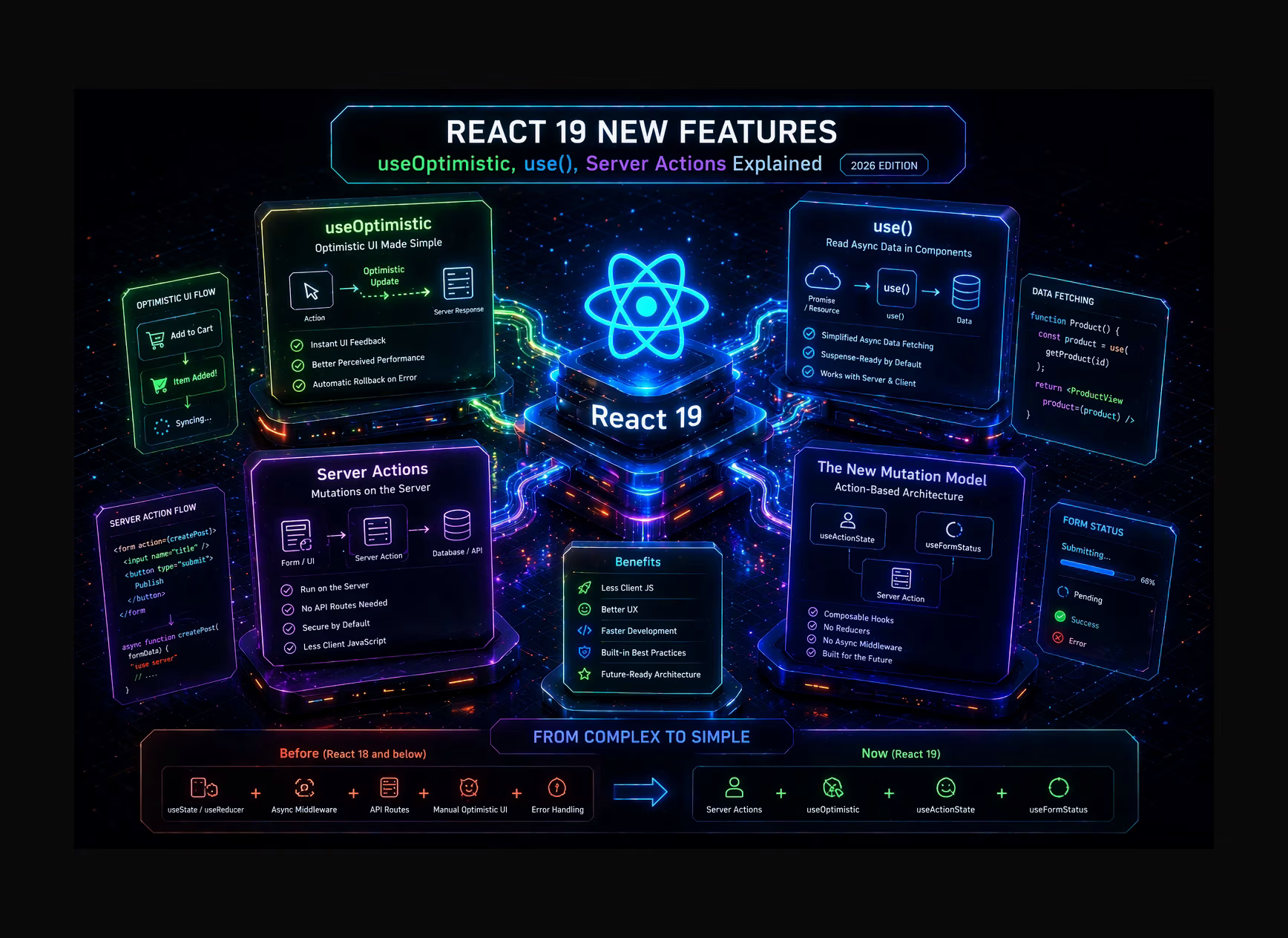
React 19, stable since December 2024, is the biggest API surface change since Hooks in 16.8. It introduces five new primitives that together shift React's mutation model from the component-external store pattern (Redux, Zustand, useState + useEffect + fetch) to an action-based model that's server-aware, Progressive Enhancement-compatible, and built on top of React's concurrent renderer.
In this post I walk through each primitive at the mechanism level:
useOptimistic- how concurrent state composition gives you instant UI feedback with automatic rollback, no manual state management neededuse()- why reading Promises and Context inside conditionals is different fromuseContextandasync/await, and when it actually applies- Server Actions - the RPC-over-HTTP contract, action ID generation, CSRF protection, and Progressive Enhancement via the form
actionattribute useActionState- the state-threading pattern that replaceduseFormStateand howisPendingkills the manual loading-state boilerplateuseFormStatus- the parent-form context mechanism
At the end: how all five compose into a single mutation pattern that replaces the entire useState + useEffect + fetch + loading + rollback stack.
Part I - useOptimistic: Concurrent State Composition
useOptimistic is React 19's answer to a specific UX problem that every data-mutation UI faces: the gap between when a user takes an action (clicks 'Like', submits a form, adds an item to a cart) and when the server confirms that action. Without optimistic state, the UI freezes or shows a loading spinner for 200–600ms on every mutation. With useOptimistic, the UI immediately reflects the user's action, and if the server rejects it, React automatically reverts to the server-confirmed state.
- Signature:
const [optimisticState, addOptimistic] = useOptimistic(state, updateFn). The first argument is the actual (server-authoritative) state. The second is an update function(currentState, optimisticValue) => newOptimisticState- a pure function that computes what the state should look like if the pending action succeeds.addOptimistic(value)is called to immediately apply an optimistic update. - Render-phase composition mechanism: When
addOptimistic(value)is called, React does not store the optimistic value in a separate state variable - it enqueues an update on the same state slot asstate. During the next render, React appliesupdateFn(currentState, value)to computeoptimisticState. While the async action is pending (betweenaddOptimisticcall and action completion), every render returns the composed optimistic state. When the action completes andstateis updated by the server response, React discards the optimistic composition and renders with the new authoritative state. If the action throws, React revertsoptimisticStateto the value ofstateas it was beforeaddOptimisticwas called - automatic rollback, no explicit error handler needed. - Multiple concurrent optimistic updates: If the user clicks 'Like' on three posts before any server response arrives, three
addOptimisticcalls enqueue three update functions. React applies them in order:updateFn(updateFn(updateFn(baseState, v1), v2), v3). Each pending action has independent error handling - if the second action fails, only the second optimistic update is rolled back; the first and third remain pending or complete normally. - Pre-React 19 equivalent (for comparison): Implementing optimistic updates previously required:
const [optimistic, setOptimistic] = useState(false); const [isPending, startTransition] = useTransition(); const handleClick = () => { setOptimistic(true); startTransition(async () => { try { await mutate(); } catch { setOptimistic(false); } }); }.useOptimisticreplaces this pattern with a single hook call and automatic rollback.
Part II - The use() Hook: Conditional Resource Reading
The use() function (deliberately not named usePromise or useContext - it is a general resource-reading primitive) introduces a mechanism that was previously only available through the Suspense internals: reading a pending resource and suspending the component until it resolves, with full support for conditional invocation.
- use(promise) - Suspense integration in Client Components:
const data = use(promise). Ifpromiseis still pending, React suspends the component - it throws the promise upward to the nearest Suspense boundary, just as RSC async functions suspend whenawaitis encountered. When the promise resolves, React resumes the render with the resolved value. UnlikeuseEffect + useState, there is no intermediate render withnulldata - the component renders exactly once with the resolved value. This eliminates theif (!data) return <Loading />guard pattern. - use(promise) vs async Server Components: In a Server Component,
const data = await fetchData()is the correct pattern - the component is an async function, andawaitpauses its execution until the data is ready.use()is for Client Components that need to read a Promise passed as a prop (typically from a Server Component that initiated the fetch). The Server Component starts the fetch and passes the Promise to the Client Component; the Client Component callsuse(promise)to read it. This enables server-initiated data fetching with client-side rendering - the fetch starts on the server but the Suspense boundary is on the client. - use(context) - conditional Context reading:
const theme = use(ThemeContext). Functionally equivalent touseContext(ThemeContext), but with one critical difference:use()can be called inside conditional blocks and loops. Traditional hooks cannot appear afterifstatements (the Rules of Hooks).use()is not a hook in the traditional sense - it is a compiler primitive that does not rely on call-order stability. This enables patterns like:if (isAdmin) { const adminConfig = use(AdminContext); }- previously impossible withuseContext. - The Thenables contract:
use()accepts any 'thenable' - an object with a.then()method - not just native Promises. This makes it compatible with custom resource types, cache primitives (like React Query's Query objects), and lazy-loaded modules.
Part III - Server Actions: The RPC-over-HTTP Contract
Server Actions are the mechanism that makes mutations in React 19 / Next.js App Router work without client-side API endpoint management. The 'use server' directive on an async function transforms it from a regular function into a server-side operation accessible from the client - without writing a Route Handler or an API endpoint.
The mechanism at the framework level: during the Next.js build, every 'use server' function is assigned a unique action ID (a hash of the module path + export name). The server maintains a registry mapping action IDs to function implementations.
When the client calls a Server Action, React's runtime serializes the arguments (using the React DOM server serialization protocol) and sends an HTTP POST to the framework's action endpoint with the action ID in the request. The server looks up the action ID in the registry, deserializes the arguments, and executes the function. The response is a streaming React Server Component payload - allowing Server Actions to trigger RSC re-renders that update server-rendered content in the UI.
- Progressive Enhancement via
<form action={serverAction}>: When a Server Action is passed as theactionattribute of a<form>element, form submission works without JavaScript - the browser performs a standard HTTP POST to the framework's action endpoint, the server processes the action, and the response is a full server-rendered page. When JavaScript is available, React intercepts the form submission and handles it via streaming RSC update instead of a full page reload. This is Progressive Enhancement by default - the same code path works in both JS-enabled and JS-disabled environments. - CSRF protection mechanism: React's Server Action implementation generates a request token (bound to the current session / origin) that is embedded in the client bundle as part of the action reference. The token is validated server-side before executing the action. This prevents cross-site request forgery without requiring developers to manually manage CSRF tokens. The protection is automatic and does not require additional middleware.
- Security requirement: all arguments must be validated server-side: Server Action arguments are serialized HTTP POST body data - they are user-controllable. A Server Action
async function deleteItem(id: string)should not trust thatidis a valid ID for the current user. Validate:const user = await getSession(); const item = await db.items.findUnique({ where: { id, userId: user.id } }); if (!item) throw new Error('Unauthorized');. Never assume the action is called only from your own UI. - Server Actions in Next.js App Router - co-location: Server Actions can be defined in a
actions.tsfile with'use server'at the top (all exports become Server Actions), or inline in Server Components with'use server'as the first line inside the function body. The inline form is only valid inside Server Component files - not in Client Components (which can only call Server Actions, not define them).
Part IV - useActionState: State Threading for Server Mutations
useActionState (renamed from useFormState in React 19 RC, with useFormState deprecated) is the hook that wires an action function to a persistent state value, threading the previous state into each action call. It is the primary mechanism for handling Server Action responses in the UI.
- Signature:
const [state, dispatch, isPending] = useActionState(action, initialState, permalink?). Theactionparameter has signature(previousState: S, formData: FormData) => Promise<S>. On each invocation, the action receives both the previous state and the new form data. The return value becomes the new state.dispatchis the function to call the action (or can be passed as a form'sactionprop).isPendingistruewhile the action is in flight. - The state threading pattern: The
actionis a pure(-ish) function that takes the current state and new input, and returns the next state. This mirrors the reducer pattern from Redux/useReducer, but operates over async server operations. Example: a contact form action returns{ success: boolean, errors: Record<string, string> | null }from the server;useActionStateholds this state and passes it back to the action on the next submission. The component readsstate.errorsto display validation messages - no client-side validation code, nouseStatefor error state. isPendingas the loading state primitive: The third return valueisPendingistruefrom the momentdispatchis called until the action promise resolves. This replaces theconst [loading, setLoading] = useState(false)pattern - React manages the loading state internally. CombiningisPendingwithuseOptimisticproduces the full optimistic + loading pattern: show optimistic UI immediately, show loading indicator in secondary controls, revert if action fails.permalinkfor Progressive Enhancement: The optional third argument is a URL that the browser redirects to after the action completes in the no-JavaScript path. This enables Progressive Enhancement for pages that useuseActionState- JS-disabled users complete the action via a full page cycle.
Part V - useFormStatus: Parent Form Context
useFormStatus reads the submission status of the nearest ancestor <form> element. Its primary use case is building submit buttons and form feedback components that respond to form submission state without receiving props from the form's container component.
- Signature:
const { pending, data, method, action } = useFormStatus().pendingistruewhile the form is submitting.datais theFormDatabeing submitted (useful for showing a preview of what was submitted).methodis the HTTP method.actionis the action URL or function. - Parent form context mechanism:
useFormStatusis implemented via a React context that<form>elements withactionprops automatically provide to their descendant tree. It reads the submission state of the nearest ancestor form with an action, not any form on the page. This is whyuseFormStatusmust be called inside a component that is a descendant of the<form>- calling it in the same component that renders the<form>returns{ pending: false }because the context is not yet in scope. - The correct
<SubmitButton>pattern:function SubmitButton() { const { pending } = useFormStatus(); return <button type='submit' disabled={pending}>{pending ? 'Submitting...' : 'Submit'}</button>; }. This component can be used in any form - it reads its parent form's pending state automatically without prop drilling. In previous React patterns, achieving this required passing anisLoadingprop from the form container down to the button, creating coupling between the form and its submit button.
Part VI - ref as Prop and Context as Provider
React 19 includes two syntax simplifications that reduce boilerplate without changing semantics. Both are backwards compatible - the old APIs continue to work.
- ref as prop (forwardRef deprecated): In React 18, function components could not accept
refas a prop without wrapping inReact.forwardRef(). The wrapper was necessary because React historically interceptedrefbefore it reached the component. In React 19,refis a regular prop in function components.function Input({ ref, ...props }) { return <input ref={ref} {...props} />; }works withoutforwardRef. The change is in React's reconciler: it no longer special-cases therefprop for function components - it passes it through like any other prop.React.forwardRefcontinues to work but logs a deprecation warning in development mode. - Context as provider (
<Context value={...}>): In React 18, rendering a context required<ThemeContext.Provider value={theme}>. In React 19, the context object itself is a valid JSX element:<ThemeContext value={theme}>. The old<Context.Provider>syntax continues to work. The implementation:createContextreturns an object that is both the consumer and the provider - the JSX element form renders the Provider variant. This is a cosmetic change with zero runtime semantics difference. - Cleanup functions from refs: React 19 ref callbacks can return a cleanup function (like
useEffect).<div ref={(node) => { node.addEventListener('click', handler); return () => node.removeEventListener('click', handler); }}. React calls the cleanup when the component unmounts or when the ref is reassigned. Previously, ref callbacks had no cleanup mechanism - cleanup required checkingif (node === null)in the same callback.
Part VII - Document Metadata and Asset Loading APIs
- Document metadata hoisting: In React 19,
<title>,<meta>, and<link>tags rendered inside components are automatically hoisted to the document<head>.function ArticlePage({ title }) { return <article><title>{title}</title><p>Content</p></article>; }renders<title>in<head>and<p>in<body>. Duplicate<title>tags are deduplicated - the last one wins. This works in both Client and Server Components and is framework-agnostic. In Next.js App Router,generateMetadata()is still the preferred pattern for SSR metadata because it integrates with streaming and is evaluated before the page component renders; the component-level<title>API is more useful for client-rendered SPAs and non-Next.js apps. - Stylesheet deduplication via precedence:
<link rel='stylesheet' href='/critical.css' precedence='high' />rendered in any component inserts the stylesheet into<head>with deduplication - multiple components rendering the samehrefproduce only one<link>tag. Theprecedenceattribute controls insertion order:'high'stylesheets are inserted before'default'. This enables component-scoped CSS loading without CSS-in-JS runtime overhead and without build-time extraction. - Asset preloading functions (react-dom): React 19 exports imperative functions for resource hints:
import { preload, preloadModule, prefetchDNS, preconnect } from 'react-dom'.preload('/fonts/inter.woff2', { as: 'font', type: 'font/woff2', crossOrigin: 'anonymous' })emits<link rel='preload'>in the document head. These functions can be called anywhere - including inside event handlers - and are deduplicated. They integrate with React's streaming renderer, so preload hints appear in the initial HTML chunk even when called from components that render in later streaming flushes.
Part VIII - The Action-Based Mutation Architecture
The five new React 19 primitives are designed to compose. The architectural synthesis - what React's core team calls the 'action-based mutation model' - replaces the useState + useEffect + fetch + manual loading state + manual error state + manual rollback pattern that was standard in React 18 for server mutation flows. Understanding the composition is essential for evaluating when to adopt this model.
- The composition pattern: A complete mutation flow in React 19 uses: (1)
Server Action- the server function that performs the mutation; (2)useActionState(serverAction, initialState)- wires the action to persistent state and providesisPending; (3)useOptimistic(serverState, updateFn)- provides immediate UI feedback while the action is pending; (4)useFormStatus(in the submit button component) - disables the button during submission. These four primitives replace: a Zustand store with aloadingflag + anerrorstate + anoptimisticstate + afetchcall inuseEffect+ atry/catchfor rollback. - Example: cart add-to-cart in headless Shopify:
const [cartState, addToCart, isPending] = useActionState(addToCartAction, initialCart); const [optimisticCart, addOptimistic] = useOptimistic(cartState, (state, newLine) => ({ ...state, lines: [...state.lines, newLine] })); const handleAddToCart = async (variantId) => { addOptimistic({ variantId, quantity: 1 }); await addToCart({ variantId }); };. The cart count updates instantly on click; if the Shopify API call fails, the cart reverts;isPendingenables the submit button's loading state. This replaces the complete cart mutation implementation described in the headless Shopify guide - same concept, React 19 native API. - When the action model does NOT replace external stores: Complex client-side state that is not tied to server mutations - drag-and-drop state, multi-step wizard state, real-time collaborative state (WebSocket-driven) - still belongs in
useReducer, Zustand, or XState. The action model is specifically superior for server mutation flows - form submissions, database writes, API mutations. For UI state that lives entirely in the client, the traditional patterns remain appropriate. - Integration with Next.js App Router: Server Actions in Next.js automatically invalidate the Full Route Cache and trigger RSC re-renders for the affected route when they complete. A Server Action that updates a product's inventory calls
revalidateTag('inventory')and the product pages re-render with fresh inventory data. This makes Server Actions the correct integration point for data mutations in the App Router - they are both the mutation mechanism and the cache invalidation trigger. For architecture context, see the App Router migration guide.
Part IX - Breaking Changes and Migration from React 18
useFormStaterenamed touseActionState:useFormStatefromreact-domis deprecated in React 19. Replace withuseActionStatefromreact. The signature is nearly identical -useActionStateaddsisPendingas a third return value and moves the hook fromreact-domtoreact.ReactDOM.renderandReactDOM.hydrateremoved: Removed in React 19 (deprecated since React 18). Replace withcreateRootandhydrateRoot. This affects legacy class-based React applications that haven't migrated.- Strict Mode behavior changes: React 19 Strict Mode no longer double-invokes state initializer functions. It still double-invokes component render functions and
useEffectsetup/cleanup in development - this behavior is unchanged. - ref object access timing: In React 18, accessing
ref.currentduring render would returnnullfor initial renders. React 19 makes this behavior more predictable and consistent across Concurrent Mode renders - but code that relied on specific timing ofref.currentpopulation may behave differently. - TypeScript changes: React 19 ships updated TypeScript type definitions that make
refa valid prop in function components (no moreforwardRefin types) and adds types foruse(),useOptimistic,useActionState,useFormStatus. Update@types/reactto 19.x alongside the React package upgrade.
Conclusion
React 19's new primitives have a clear logic to them: mutations should be actions - functions that take input and return new state - and the framework handles the async lifecycle (pending, optimistic updates, rollback) so you don't have to. The useOptimistic + useActionState + useFormStatus + Server Actions composition isn't a new abstraction layer on top of React - it's the concurrent renderer finally surfacing primitives that were previously only reachable through low-level Suspense internals and useTransition.
For teams on Next.js App Router, the action model and Server Actions are the natural mutation architecture. The PPR architecture pairs well with useOptimistic for dynamic hole interactivity. Smaller client bundles from RSC plus the reduction in mutation boilerplate make React 19 a clear upgrade for most production Next.js apps.
For React 19 architecture review or implementation guidance - React SPA development service | case studies | discuss your project.
FAQ
- Is
useOptimistica replacement for all optimistic update patterns? It replaces theuseState + useTransition + manual rollbackpattern for optimistic updates that are tightly coupled to a single async action. For complex optimistic state that spans multiple components and actions (e.g., a real-time collaborative editor), external state management (Zustand, Jotai, XState) with explicit conflict resolution logic is still appropriate. - Can
use(promise)be used in Server Components? No. Server Components are async functions - useawaitdirectly.use()is a Client Component primitive for reading Promises that were created server-side and passed as props. The typical pattern: Server Component creates a Promise (doesn't await it), passes it to a Client Component, Client Component callsuse(promise)to read the value with Suspense integration. - Are Server Actions available without Next.js? Server Actions are a React 19 feature enabled by the
'use server'directive, but they require a framework that implements the action endpoint registry and RSC streaming. Next.js is currently the primary production framework that implements this. React Server Components and Server Actions in vanilla Vite/Webpack require additional configuration (react-server-dom-webpack). - What is the difference between
useActionStateanduseReducer?useReduceris a synchronous client-side state machine - the reducer function runs synchronously and cannot perform async operations.useActionStateis an async action runner - the action function is async, runs on the server (or client), and its return value becomes the new state.useActionStateis the async, server-aware version ofuseReducer. - Should I migrate from Redux to React 19's action model? For server mutation flows (form submissions, database writes, API mutations), yes -
useActionState + Server Actionsis strictly simpler and more capable. For complex client-side application state (navigation history, multi-step UI flows, real-time state), Redux/Zustand remain valid. The migration is incremental: start by replacing individual mutation flows withuseActionState + Server Actions, not by rewriting the entire state management layer.
References
- React Team. 'React 19 Release Notes'
- React Team. 'useOptimistic Reference'
- React Team. 'use Reference'
- React Team. 'useActionState Reference'
- React Team. 'useFormStatus Reference'
- React Team. 'Server Actions'
- Next.js Team. 'Server Actions and Mutations'
- React Team. 'React 19 Upgrade Guide'
- RFC 7636. 'PKCE'
- HTTP Archive. 'Web Almanac 2025 - JavaScript'